Pomelli vs Canva AI (2026): Which is Better for Small Business Design?
In this comprehensive guide, we will break down the Pomelli vs Canva AI showdown, comparing their core features, pricing, learning curves, and real-world ROI, to help you decide which tool deserves a place in your 2026 marketing stack.
If you are a small business owner, solopreneur, or marketer, you already know the struggle of maintaining a consistent digital presence. You need to post on Instagram, update Facebook, launch Google Ads, and send out email newsletters—all while keeping your brand's colors, fonts, and tone of voice perfectly aligned. Historically, solving this problem required either hiring an expensive creative agency or spending countless hours manually designing assets.
Enter the era of AI-powered design. For years, Canva has been the undisputed king of democratized graphic design, enabling non-designers to create stunning visuals through its massive template library and recently introduced Canva Magic Studio. However, in late 2025, Google Labs and Google DeepMind disrupted the market by launching Pomelli AI—an experimental, automation-first marketing assistant designed to generate entire brand campaigns automatically.
The debate in the marketing world has now shifted: Should you stick with the familiar, template-driven ecosystem of Canva, or should you pivot to the fully automated, brand-aware generation of Google Pomelli?
1. What is Canva AI (Magic Studio)?
Launched in Australia in 2013, Canva revolutionized graphic design by replacing complex software like Adobe Photoshop with an intuitive drag-and-drop interface. Today, Canva has evolved far beyond basic templates. With the introduction of Canva Magic Studio, the platform has deeply integrated artificial intelligence into its ecosystem, acting as an all-in-one creative partner.
Core AI Features of Canva
Canva’s AI suite is designed to enhance the manual design process rather than replace it entirely. Its standout features include:
- Magic Design: Generates full layouts, presentations, and social media posts from simple text prompts.
- Magic Write: An AI text generator built into Canva Docs and design elements, helping users craft social media captions, blog ideas, and product descriptions.
- Magic Switch: Instantly resizes designs across multiple platform formats (e.g., turning an Instagram post into a YouTube thumbnail) with a single click.
- Magic Eraser & Background Remover: Seamlessly removes unwanted objects or backgrounds from images, which is incredibly useful for product photography.
- AI Image and Video Generation: Canva includes Text-to-Image capabilities and has even integrated Google’s Veo 3 model to generate short 8-second video clips.
The Canva Workflow: "Template-First"
Canva operates on a template-first philosophy. Instead of starting with a blank canvas or a complex prompt, users select from a library of over 100 million stock photos and hundreds of thousands of templates. You then manually apply your branding using the "Brand Kit" feature, where you input your specific hex codes, logos, and fonts.
2. What is Google Pomelli AI?
Google Pomelli is not just an image generator; it is an experimental, AI-powered marketing strategist built by Google Labs in collaboration with DeepMind. Launched as a public beta in the US, Canada, Australia, and New Zealand, Pomelli fundamentally reimagines how small businesses create content.
Core AI Features of Google Pomelli
Rather than asking users to design, Pomelli asks users to curate. It acts as an automated marketing engine with three flagship features:
- The Business DNA Builder: This is Pomelli's defining innovation. Instead of manually uploading a Brand Kit, you simply paste your company's website URL into Pomelli. The AI scans your public web pages and automatically extracts your exact color palettes, typography hierarchy, imagery style, and copywriting tone. This "Business DNA" becomes a permanent, strict style guide for all future outputs.
- Pomelli Photoshoot (Powered by Nano Banana 2): Product photography can cost between $500 and $5,000 per shoot. The new Photoshoot feature allows you to upload a basic, messy smartphone picture of your product. Pomelli’s Nano Banana 2 model intelligently extracts the product and places it into high-end, photorealistic studio or lifestyle environments that match your Business DNA.
- Cinematic Animate (Powered by Veo 3.1): Static images are rapidly losing engagement. Pomelli integrates Google's Veo 3.1 video generation model, allowing users to turn any generated static image into a high-definition (720p/1080p) cinematic video up to 148 seconds long with realistic motion, lighting, and sound—all with a single click.
The Pomelli Workflow: "Automation-First"
Pomelli’s workflow is completely inverted compared to Canva. You input your URL, Pomelli builds your brand profile, and then it automatically suggests tailored campaign ideas (e.g., "Spring Skincare Sale"). When you select a campaign, Pomelli generates the ad copy, the visuals, and the varying sizes for multiple platforms simultaneously. You then use natural language commands (like "make the headline punchier") to refine the assets.
3. Pomelli vs Canva AI: The Feature-by-Feature Showdown
To truly understand which tool is better for your small business, we must look at how they perform side-by-side across critical marketing categories.
A. Brand Consistency & Setup
Canva: Setting up a brand in Canva requires a premium subscription (Canva Pro) and manual labor. You must manually upload your logo variations, find or upload your specific fonts, and input your exact color hex codes. Even with a Brand Kit, the user must actively remember to apply these rules to the templates they select. This often results in "voice drift," where different team members create content that sounds or looks slightly different.
Pomelli: Pomelli shines in its onboarding. By pasting your URL, the AI autonomously builds your Business DNA in 30 to 90 seconds. Because this DNA acts as a persistent vector profile, every single asset Pomelli generates is mathematically anchored to your brand.
🏆 Winner: Pomelli AI. It completely removes the human error associated with manual brand enforcement.
B. Speed and Content Generation
Canva: While Canva is incredibly intuitive, it still requires manual assembly. You choose a template, rewrite the copy (or use Magic Write), adjust the layout, and resize for different platforms. In a timed test by marketing experts, creating a small campaign (landing page hero, 3 ads, 1 email) entirely in Canva took about 2 hours and 5 minutes.
Pomelli: Pomelli generates entire asset suites simultaneously. You ask for a campaign, and it generates the Instagram post, Facebook ad, and email header all sharing the exact same visual identity in about 60 seconds. When experts tested a Pomelli-first workflow, the same campaign took only 1 hour and 23 minutes—a 33% reduction in time.
🏆 Winner: Pomelli AI for sheer speed and multi-asset campaign drafting.
C. Design Control and Flexibility
Canva: Canva offers unparalleled control for a non-professional design tool. You can manipulate layers, adjust transparency, group objects, utilize an interactive whiteboard, and pick from millions of individual graphics. If you have a specific, highly customized vision in your head, Canva provides the canvas to build it.
Pomelli: Pomelli is intentionally restrictive to maintain brand guardrails. You edit via conversational AI rather than complex menus. While you can tweak text, swap backgrounds, and change headlines, you cannot freely drag and drop elements with pixel-perfect precision.
🏆 Winner: Canva. For users who want deep, granular control over their designs, Canva remains undefeated.
D. Advanced Visuals (Photography & Video)
Canva: Canva relies heavily on its massive stock photo library and basic text-to-image generation. While it recently incorporated Veo 3 for short 8-second clips, its core strength remains static graphic design and basic animation transitions.
Pomelli: With the recent introduction of the Photoshoot feature, Pomelli offers studio-grade product photography replacement using the Nano Banana 2 model. Furthermore, its Animate feature utilizes Veo 3.1 to create cinematic, physics-informed videos (like steam rising from coffee) natively within the app.
🏆 Winner: Pomelli AI for producing high-fidelity, photorealistic product imagery and advanced AI video.
E. Social Media Management & Publishing
Canva: Canva features a robust Content Planner that allows you to schedule and automatically publish your designs directly to Instagram, Facebook, Twitter, and LinkedIn without ever leaving the platform.
Pomelli: Currently, Pomelli is strictly an asset generator. It has no direct publishing or scheduling capabilities. You must download the ZIP files of your generated campaigns and manually upload them to your social media accounts or a third-party scheduler like Hootsuite.
🏆 Winner: Canva. The ability to schedule and post directly is a massive time-saver for solo marketers.
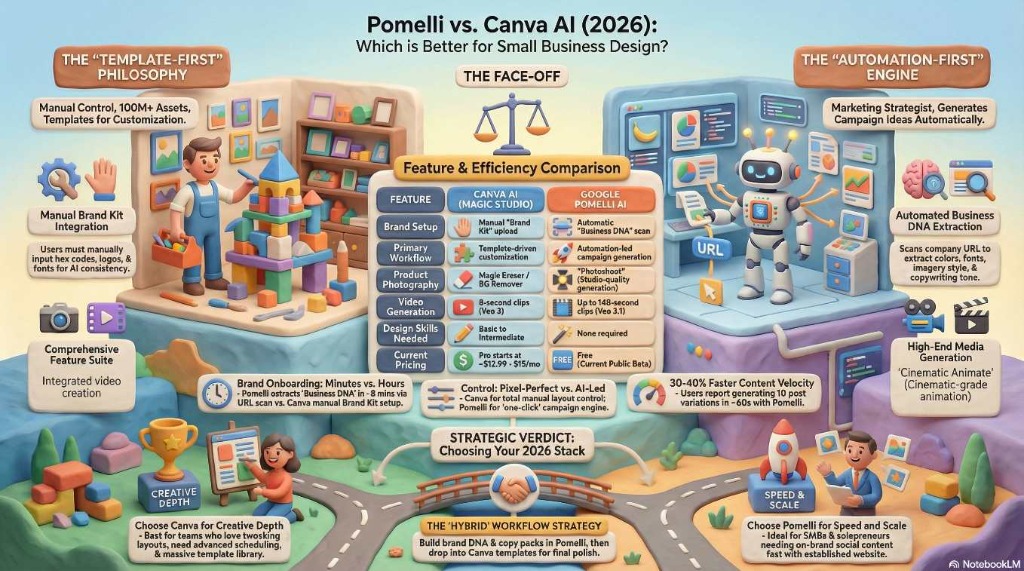
4. Side-by-Side Comparison Infographic
For a quick visual summary of how these two digital marketing titans stack up in 2026, reference this feature and workflow comparison:
5. Pricing Comparison & ROI
When evaluating software for a small business, the bottom line often dictates the final decision.
Canva Pricing
Canva operates on a highly successful freemium model.
- Free Tier: Offers basic tools and a massive selection of templates, but locks many AI features (Magic Studio) and the Brand Kit behind a paywall.
- Canva Pro: Starts at roughly $15 per month for individuals. This unlocks the Brand Kit, background removers, premium stock assets, and the full suite of AI design tools.
- Canva Teams: Starts at $10 per month/per user (minimum of three users) for collaborative workflows.
Google Pomelli Pricing
Currently, Pomelli is operating as an experimental project under Google Labs and is 100% Free.
- There are no usage limits during this beta phase, no credit cards required, and you gain access to premium models like Nano Banana 2 and Veo 3.1 at zero cost.
- Note: Industry analysts expect that as Pomelli exits public beta, Google will likely introduce a tiered pricing structure, potentially integrating it into Google Workspace or offering premium compute limits.
ROI for Small Businesses: If you are currently paying a freelance designer $300-$800 for a social media campaign package, Pomelli can instantly replace that cost. Furthermore, by leveraging Pomelli's Photoshoot feature, e-commerce businesses can save up to $5,000 per month by eliminating the need for physical product photography studios.
6. The Verdict: Which Tool Should You Choose?
Choose Canva AI If:
- You want absolute, granular control over every pixel, layer, and font in your design.
- You manage multiple clients and require deep collaborative features and whiteboard planning.
- You need an all-in-one tool that allows you to design, schedule, and publish directly to your social media accounts.
- You operate in languages other than English.
Choose Pomelli AI If:
- You are a solo founder or small business owner with zero design experience who struggles to keep content looking "on-brand".
- You need to generate high volumes of cross-platform campaign assets (Instagram, Google Ads, Email banners) incredibly fast.
- You run an e-commerce business and want to turn simple smartphone photos into expensive-looking lifestyle product shots utilizing Photoshoot.
- You want to animate static graphics into high-quality video ads without learning complex editing software.
The Ultimate 2026 Strategy: The Hybrid Workflow
Savvy marketers aren't choosing just one—they are combining them. The most effective 2026 workflow involves using Pomelli AI as your strategic brain to establish your Business DNA, ideate campaigns, and generate perfectly branded baseline copy and images in seconds.
You then download those high-quality assets and drop them into Canva Pro to apply pixel-perfect layout adjustments, add specific graphic flourishes, and utilize Canva’s built-in scheduler to auto-publish your campaign.
By using Pomelli for the words and brand enforcement, and Canva for the canvas and distribution, small businesses can achieve agency-level marketing output in a fraction of the time.