How to Extract Your "Business DNA" Using Google Pomelli AI (Complete 2026 Guide)
In this comprehensive 2026 guide, we will dive deep into exactly what Business DNA is, the technical architecture behind how it works, and a step-by-step framework to extract, refine, and utilize your Business DNA.
For small and medium-sized business (SMB) owners, solopreneurs, and agile marketing teams, creating content isn't the hardest part of the job—maintaining brand consistency is. You can easily use ChatGPT to write a caption or Midjourney to generate an image. But ensuring that the caption sounds exactly like your brand's unique voice, and that the image flawlessly incorporates your specific brand colors and aesthetic, is an entirely different challenge.
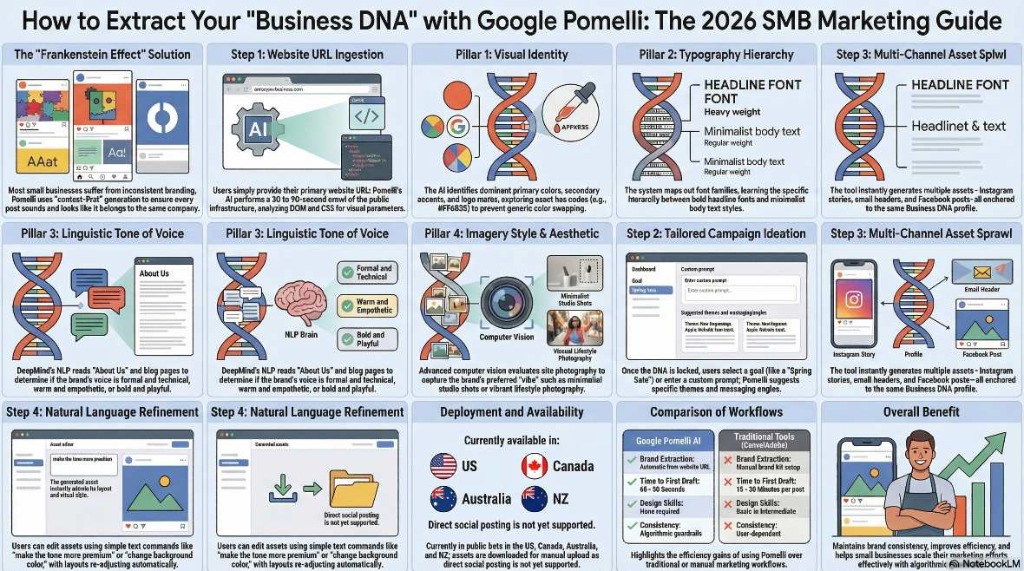
Historically, this lack of cohesion leads to the "Frankenstein effect"—a social media feed or advertising campaign where every post looks and sounds like it was created by a completely different company. According to marketing research, maintaining consistent brand presentation across platforms can increase revenue by up to 23%. Yet, almost 70% of small businesses lack strong brand guidelines.
To solve this massive friction point, Google Labs, in partnership with Google DeepMind, introduced Pomelli AI. And at the very core of this revolutionary marketing tool is a groundbreaking feature known as the "Business DNA" builder.
Instead of forcing you to manually upload hex codes, font files, and logo variations into a blank dashboard, Pomelli acts as a digital strategist. It scans your existing website and automatically extracts your brand's identity to build a reusable, permanent vector profile.
1. What Exactly is "Business DNA" in Google Pomelli?
In legacy design platforms like Canva or Adobe Express, brand consistency requires manual configuration. You must set up a "Brand Kit" by manually inputting primary and secondary colors, uploading typography, and adding logo files. Even then, the software relies on the human user to actively apply these rules to pre-made templates.
Google Pomelli flips this workflow on its head through "context-first" generation. The Business DNA is an algorithmic interpretation of your brand's visual and editorial hierarchy. When you feed Pomelli your website URL, it builds a comprehensive profile that acts as an unbreakable set of strategic guardrails for the AI.
The Four Pillars of Business DNA
When Pomelli analyzes your URL, it breaks your business down into four distinct extraction pillars:
- Visual Identity (Color Palette & Logos): The AI scans the site to identify not just one color, but your dominant primary colors, secondary accent colors, and precise background shades. It captures exact hex codes (e.g., #FF6B35) so your specific brand of orange is never randomly swapped for a generic alternative.
- Typography Hierarchy: The system maps out your font families. It learns the difference between your bold, eye-catching headline fonts and your readable, minimalist body text styles.
- Linguistic Tone of Voice: This is where DeepMind's Natural Language Processing (NLP) shines. Pomelli reads your "About Us" page, blog posts, and product descriptions to capture how you speak. It determines if your brand is formal and technical, warm and empathetic, or bold and playful.
- Imagery Style and Aesthetic: Through advanced computer vision, the AI evaluates the photography and graphics on your site. It notes whether you prefer minimalist studio shots, vibrant lifestyle photography, or corporate graphics.
2. The Technical Architecture: How Does Pomelli Scan Your Brand?
Understanding the backend of the Business DNA extraction can help you optimize your website to yield better results. Pomelli does not just take a quick screenshot of your homepage; it performs a deep, multi-layered crawl of your public digital infrastructure.
- DOM and CSS Analysis: To extract visual parameters flawlessly, the system analyzes the Document Object Model (DOM) and the CSS of your target website. This is how it flawlessly pulls your exact font names and color hex codes.
- DeepMind Language Models: To understand your brand's positioning, the AI doesn't just look at individual words; it performs a semantic analysis of your copy. It extracts your core mission statements, unique selling points (USPs), and taglines, using them to inform the narrative direction of the campaigns it will suggest later.
- Speed and Processing: Despite the depth of this scan, the entire extraction pipeline is incredibly fast, typically concluding within 30 to 90 seconds.
The culmination of this process is a synthesized profile. Think of it as an automated, highly intelligent brand style guide that lives inside the AI, ready to be deployed at a moment's notice.
3. Step-by-Step Guide: How to Extract Your Business DNA
Extracting your Business DNA is a straightforward process, but getting it perfect requires a slight human touch. Here is the exact workflow you should follow inside the Pomelli Labs dashboard.
Step 1: Access Google Pomelli
Currently, Pomelli is a free experimental tool available in public beta. Navigate to labs.google.com/pomelli and log in using your standard Google account. (Note: As of early 2026, official availability includes the US, Canada, Australia, and New Zealand, though users globally are finding workarounds).
Step 2: Feed the AI Your URL
Upon launching the tool, you will be greeted by the onboarding screen. You will see a simple input field prompting you to enter your website URL.
Step 3: The Scanning Phase
Click "Analyze." For the next 30 to 90 seconds, you will see Pomelli actively working. The UI provides real-time transparency, showing status updates like "studying brand values," "pulling images," and "analyzing tone of voice".
Step 4: The Crucial "Human-in-the-Loop" Review
Once the scan finishes, Pomelli does not immediately start generating ads. Instead, it presents you with the generated Business DNA dashboard. You will see a visual layout of:
- The extracted logo.
- 4-5 color swatches with hex codes.
- Typography pairings.
- A summary of your brand's tone (e.g., "Professional, Trustworthy, Confident").
- A generated tagline and business description.
This is the most important step: You must review this data carefully. AI is powerful, but it isn't flawless. If your website was running a temporary red-themed holiday banner during the scan, Pomelli might mistakenly assume red is your primary brand color.
- Click into the color swatches to adjust or delete incorrect hex codes.
- Tweak the tone-of-voice descriptors if they feel slightly off.
- If the AI pulled a low-resolution version of your logo, you can manually upload a crisp, high-resolution SVG or PNG file.
Once you click "Looks Good," your Business DNA is locked in and ready for deployment.
4. How to Optimize Your Website for a Perfect DNA Scan
As the old computing adage goes: Garbage In, Garbage Out. Pomelli's effectiveness depends entirely on the quality of the website it analyzes. If your website has inconsistent branding, unclear messaging, or outdated visuals, the generated Business DNA profile will be weak, leading to generic, template-like AI outputs.
Here is an optimization checklist to ensure Pomelli generates agency-quality assets for you:
1. Clean Up Your Visual Hierarchy (CSS)
Ensure your website's CSS is clean and standardized. If you use five different font families across your homepage, the AI will get confused. Stick to a strict primary (headline) and secondary (body) font structure.
2. Strengthen Your "About Us" Page
Pomelli relies heavily on your text to understand your brand persona. If your site only features product specs and prices, the AI won't know how to speak to your customers. Ensure your homepage or "About Us" page features a clear mission statement, a defined target audience, and copy that reflects your desired tone.
3. Audit Your Live Imagery
Pomelli's computer vision analyzes your existing photos to set the style for future AI generations. If your site is cluttered with cheap, generic stock photos, Pomelli will generate generic assets. Ensure the images reflect the actual aesthetic you want—dark and moody, vibrant lifestyle, or minimalist.
5. What Happens After the DNA is Extracted?
Once your Business DNA is established, Pomelli transforms from an analyzer into an execution engine. The workflow shifts from "designing" to "assembling".
Tailored Campaign Ideation
Instead of staring at a blank screen wondering what to post on Instagram today, Pomelli enters ideation mode. Based on your DNA and product context, the AI suggests tailored marketing campaigns. For example, if you run a boutique coffee shop, it might automatically suggest a "Spring Cold Brew Launch" or a "Local Community Discount Week".
High-Velocity Asset Production
When you select an idea or type in a custom prompt, Pomelli generates a complete suite of assets in roughly 60 seconds. You don't just get one image; you get:
- Square (1:1) Instagram feed posts with branded captions.
- Vertical (9:16) graphics for Instagram Stories and TikTok.
- Professional, text-heavy posts optimized for LinkedIn.
- Display banner sizes for email newsletters.
Every single one of these assets utilizes the exact hex codes, fonts, and tone of voice locked inside your Business DNA.
The Edit and Polish Phase
Despite the automation, Pomelli keeps you in the driver's seat. Through natural language editing, you can click on a generated asset and type commands like, "Make the headline punchier," "Swap the background to a sunny office," or "Shorten the caption". The AI adjusts the asset dynamically, ensuring it remains perfectly on-brand.
6. Pomelli's Business DNA vs. The Competition
To truly grasp the value of the Business DNA feature, we must look at how it compares to the current giants of the digital marketing software industry.
| Feature Category | Google Pomelli AI | Canva (Magic Studio) | Adobe Express |
|---|---|---|---|
| Brand Setup Method | Automatic URL extraction (30-90s) | Manual upload via Brand Kit | Manual upload / Cloud sync |
| Design Philosophy | Automation-first, Context-first | Template-first, Manual edit | Professional, Layer-based |
| Consistency | High: Algorithmic guardrails | Moderate: Relies on user | Moderate: Relies on user |
| Generation Speed | ~60s (Multi-asset) | 15–30 mins / post | 20–40 mins / post |
| Copywriting Tone | Tailored to website NLP scan | Generic AI / Manual | Firefly / Manual |
7. Current Limitations of Business DNA
While the technology is revolutionary, it is important to acknowledge that Pomelli is still a Google Labs experiment. Users should be aware of a few operational quirks:
- The Sub-Brand Problem: Currently, Pomelli extracts one Business DNA profile per website. If your company URL hosts multiple distinct sub-brands (e.g., a restaurant group with both a high-end steakhouse and a casual taco stand on the same site), the AI will blend them into a confused, hybrid profile. Workaround: Run separate analyses using specific landing page URLs that represent each distinct sub-brand.
- Language Restrictions: As of early 2026, the NLP scan and copy generation are strictly optimized for English. Multilingual websites may experience fragmented tone extraction.
- The "Safe Median" Aesthetic: Because AI models aim for mathematical optimization, the generated DNA sometimes leans toward a "safe, corporate" aesthetic. Highly avant-garde or edgy brands may need to rely heavily on the natural language editing features to inject more "soul" back into the generated assets.
Conclusion: The Future of Brand-Aware Automation
The ability to extract your Business DNA using Google Pomelli represents a paradigm shift in digital marketing. We are moving away from an era where "good branding" was a luxury reserved for companies with massive agency retainers, and stepping into a reality where baseline professional quality is automated, instant, and free.
By simply pasting your URL, you empower an AI to act as your dedicated brand guardian, ensuring that your colors, fonts, and voice never drift off-course. While human strategy and final curation remain essential, Pomelli handles the tedious mechanics of brand enforcement, giving small business owners their most valuable asset back: Time.
Ready to see what the AI thinks of your brand? Head over to Google Labs today, input your website URL, and watch your unique Business DNA come to life.