How to Use Google Pomelli AI in India: The Complete Setup Guide (2026)
Indian marketers and SMBs can now access Google Pomelli AI 100% free and without a VPN. Learn how to leverage this autonomous marketing assistant to scale your brand.
If you are an Indian small business owner, a D2C (Direct-to-Consumer) founder, or a freelance marketer, you know how incredibly competitive the digital landscape has become. To survive on platforms like Instagram, Facebook, and LinkedIn, you need to post consistently, maintain high aesthetic quality, and ensure every single post screams your brand's unique identity.
Until recently, achieving this required hiring a graphic designer, a copywriter, and a social media manager—or spending countless hours struggling with template-based tools like Canva.
Then came Google Pomelli. Developed by Google Labs in collaboration with Google DeepMind, Pomelli is an experimental, autonomous AI marketing assistant. Instead of making you start from a blank canvas, Pomelli scans your website, extracts your exact brand colors, fonts, and tone of voice, and generates complete, ready-to-publish marketing campaigns in seconds.
For months, Indian marketers watched in frustration as Pomelli was exclusively available to users in the US, Canada, Australia, and New Zealand. Users had to rely on slow, clunky VPNs to access the platform.
🚀 Breaking News: No VPN Required
As of the massive March 9, 2026 update, Google Pomelli is officially available in India—100% free, and without the need for a VPN.
1. The Big News: Google Pomelli is Officially Live in India
If you tried to access Pomelli in late 2025 or early 2026, you likely saw the dreaded "Not available in your region" error screen. However, on March 9, 2026, Google Labs expanded Pomelli's public beta to over 170 countries—including India.
What this means for Indian users:
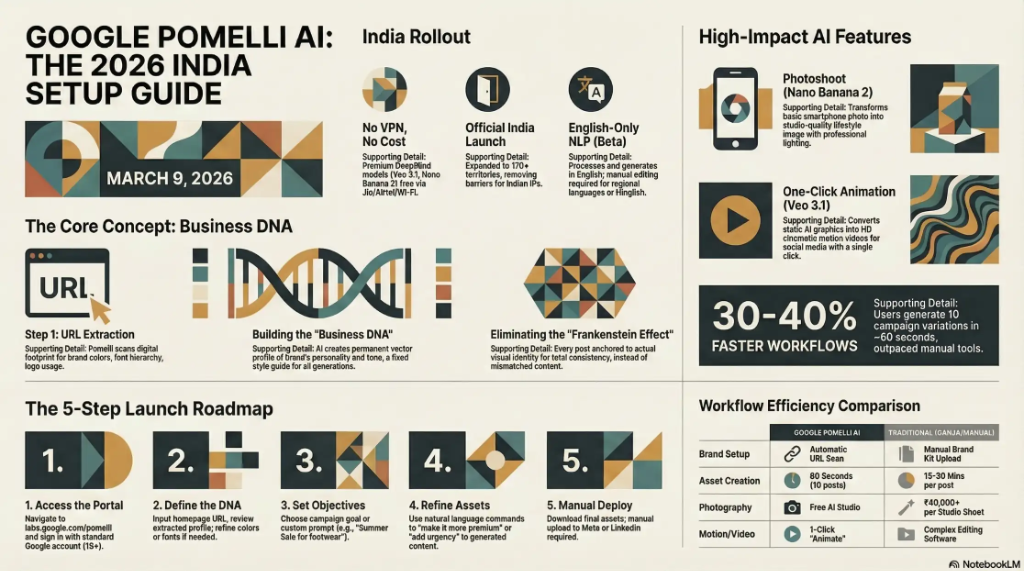
- No More VPNs: You can navigate directly to the Google Labs portal from your standard Indian IP address (Jio, Airtel, etc.) and get immediate access.
- Zero Cost: Access premium DeepMind AI models like Veo 3.1 and Nano Banana 2 absolutely free during the public experimental beta.
- Language Limitation: NLP models currently only support English. For Hindi or regional languages, you'll need to manually edit the generated English layouts.
2. Why Indian SMBs and D2C Brands Need Pomelli
India is home to one of the fastest-growing startup ecosystems. Here is why Pomelli is disrupting Indian marketing:
Eliminating the "Frankenstein Effect"
Many Indian founders use ChatGPT for text and Canva for graphics. The result is a mismatched social feed. Pomelli anchors everything to your actual website branding, ensuring 100% consistency.
Saving Thousands on Product Photography
A studio shoot in Mumbai or Bangalore can cost ₹40k-₹1L. With Pomelli Photoshoot, you can turn a basic smartphone photo into a photorealistic studio shot tailored to your brand colors instantly.
Riding the Video Wave
Turn static graphics into 1080p cinematic Reels and Shorts with Veo 3.1 integration. No Premiere Pro or editing skills required.
3. Step-by-Step Guide: How to Set Up and Use Pomelli AI in India
Step 1: Accessing the Google Labs Portal
Navigate to labs.google.com/pomelli and sign in with your standard Gmail account. No credit card or special access is needed for Indian users anymore.
Step 2: Extracting Your "Business DNA"
Paste your website URL (homepage or "About Us"). Pomelli's AI will spend 30-90 seconds crawling your DOM and CSS to pull hex codes, fonts, and logos.
Step 3: Campaign Ideation
The AI acts as a strategist, suggesting 3 to 5 campaign ideas like "Monsoon Mega-Sale" or "New Product Launch" specifically for your industry.
Step 4: Asset Generation and Curation
In ~60 seconds, you get a full pack: Instagram feeds, vertical Stories, vertical Reels (animated), and display banners. All perfectly matching your brand DNA.
Step 5: Natural Language Editing
Click any visual and type commands like "Make the background more premium" or "Change the headline to a Diwali promo." The AI adjusts in real-time.
4. Comparison: Pomelli vs. Canva vs. Hiring an Agency
| Feature | Google Pomelli AI | Canva / Adobe | Marketing Agency |
|---|---|---|---|
| Setup Process | Automatic (URL scan) | Manual Brand Kit | Manual Onboarding |
| Draft Speed | ~60 seconds | 15-30 mins per post | 2-5 Business Days |
| Cost (approx) | Free (Public Beta) | ~₹4,000 / year | ₹15k - ₹50k+ / mo |
5. Crucial Limitations to Keep in Mind
- English Only: Regional language support isn't live yet.
- Website Dependency: If your website is poorly designed, the AI's "Business DNA" extraction will be weak.
- Manual Upload: There is no direct "Post to Instagram" button. You must download and publish manually.
Frequently Asked Questions (FAQs) About Pomelli AI in India
1. Do I still need a VPN to use Google Pomelli AI in India?
No, you no longer need a VPN to access the tool. While it was initially restricted to the US, Canada, Australia, and New Zealand, the massive March 9, 2026 update officially rolled out Pomelli to over 170 countries, including India. You can now access it directly using your standard Indian internet connection by visiting labs.google.com/pomelli.
2. Is Google Pomelli completely free for Indian businesses?
Yes, Google Pomelli is 100% free to use right now. Because it is currently in its experimental public beta phase under Google Labs, Indian users can access all premium DeepMind models—including Veo 3.1 for animations and Nano Banana 2 for product photography—without any subscription fees, usage limits, or credit cards.
3. Can Pomelli generate marketing content in Hindi or regional Indian languages?
Currently, Pomelli's Natural Language Processing (NLP) models are officially supported only in the English language. If your target audience is in Tier-2 or Tier-3 Indian cities, the best workaround is to let Pomelli generate the visual designs and English layouts, and then manually edit the text layers to Hindi or Hinglish within the tool before downloading.
4. How long does the Business DNA extraction take for an Indian website?
The Business DNA extraction process is incredibly fast. Once you paste your website's URL into the Pomelli dashboard, it takes only 30 to 90 seconds for the AI to crawl your site. Within this short timeframe, it extracts your exact brand hex codes, maps your typography, and analyzes your brand's unique tone of voice to build your profile.
5. Can Pomelli automatically post to my Instagram and Facebook accounts?
No, Pomelli is currently designed strictly as an asset generation tool, not a social media scheduling platform. You cannot link your Meta, LinkedIn, or Google Ads accounts for auto-publishing. Users must download the generated high-resolution assets and manually upload them to their respective social media channels or use third-party schedulers.
Conclusion: Embrace the AI Advantage
The March 2026 expansion of Google Pomelli into India has permanently lowered the barrier to entry for professional digital marketing. You no longer need to jump through VPN hoops or pay exorbitant fees just to maintain a clean, consistent brand presence online.
Ready to see what the AI thinks of your brand? Head over to labs.google/pomelli today, drop in your website URL, and take your digital marketing into the future.