Pomelli Photoshoot: Turn Smartphone Pics into Studio-Quality Product Images (2026 Guide)
A comprehensive masterclass on using Google Pomelli Photoshoot to transform messy smartphone photos into professional, studio-grade product images—completely free.
If you run an e-commerce brand, sell handmade goods on Shopify, or manage a local retail boutique, you already know the painful truth: high-quality product photography is arguably the biggest bottleneck for your business. To survive in an increasingly visual digital marketplace, your products need to look luxurious, aspirational, and perfectly lit.
Traditionally, achieving this standard meant hiring a commercial photographer, renting studio space, arranging complex lighting rigs, and waiting weeks for edited files. A single professional product shoot can easily cost a small business anywhere between $500 and $5,000 per month.
That was until Google Labs introduced a massive, game-changing update to its AI marketing platform on February 19, 2026: Pomelli Photoshoot.
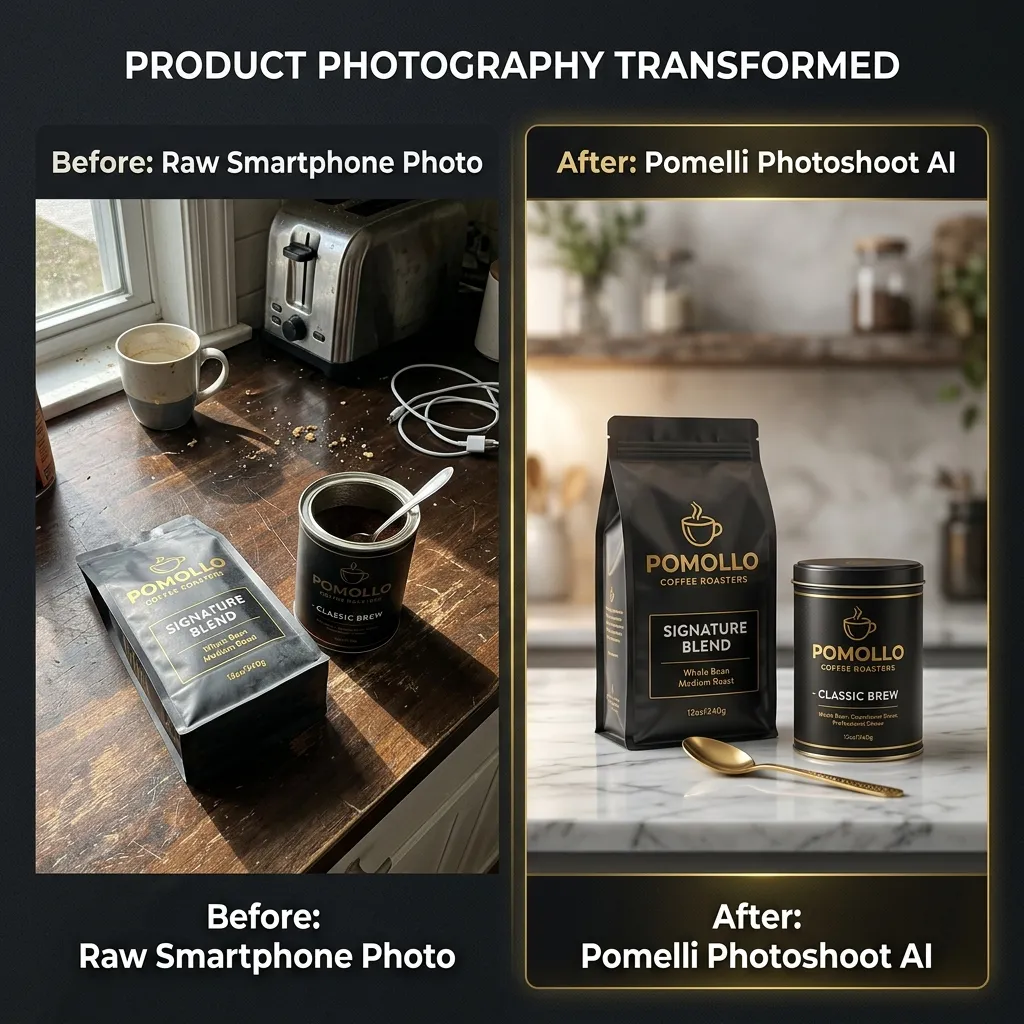
Powered by the highly advanced Nano Banana image generation model, Pomelli Photoshoot completely levels the playing field. It allows anyone with a basic smartphone to take a messy, poorly lit photo of a product and instantly transform it into a professional, studio-grade marketing image.
Here at pomelliai.co, we have spent weeks rigorously testing this new feature across multiple product categories. In this comprehensive masterclass, we will break down exactly how Pomelli Photoshoot works, how to write the perfect prompts, and how you can use this free tool to save thousands of dollars while skyrocketing your ad conversions.
1. What is Google Pomelli Photoshoot?
Before we dive into the technical tutorial, it is crucial to understand what this tool actually is.
Originally launched in late 2025, Pomelli is an experimental AI-powered marketing assistant built by Google Labs and Google DeepMind to help small-to-medium businesses (SMBs) generate on-brand campaigns. The platform's core innovation is its ability to extract a "Business DNA"—your brand's specific colors, fonts, and tone of voice—directly from your website URL.
The Photoshoot feature is the newest addition to this ecosystem. Instead of relying on generic stock photos or AI-generated objects that only look like what you sell, Photoshoot uses your actual physical product.
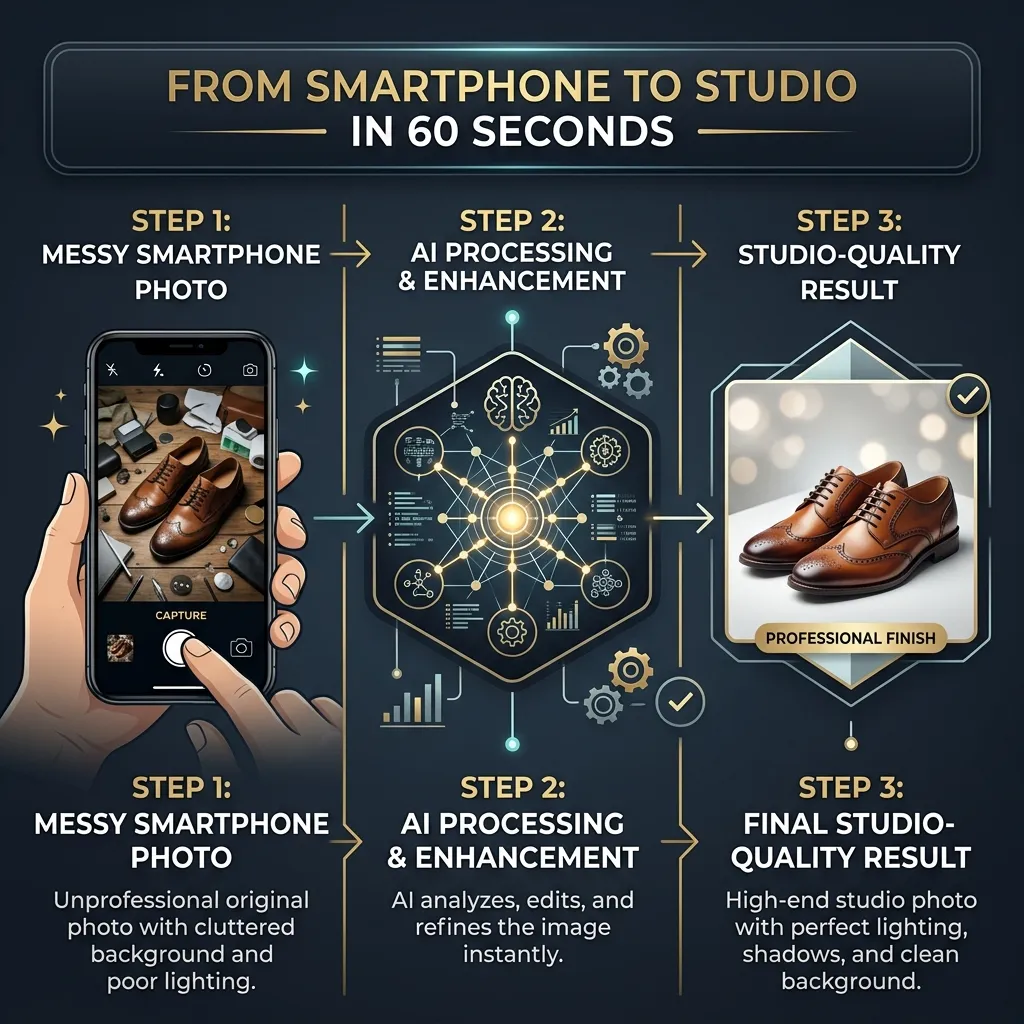
According to Google Labs, Photoshoot leverages the Nano Banana (and its upgraded iterations) image generation model. The AI intelligently analyzes the 3D geometry, original lighting, and texture of the product in your smartphone photo. It cleanly extracts the product from its original messy background and synthesizes entirely new, photorealistic studio or lifestyle environments around it.
Because it is tethered to your Pomelli Business DNA, the new background, shadows, and lighting will automatically match your brand's established aesthetic.
2. The Technology: How Nano Banana Transforms Your Images
To get the best results, you need to understand that Pomelli Photoshoot is not just a simple "background remover" tool like you might find in basic photo editing apps.
When you upload an image to traditional background removers, they simply cut out the subject and slap it onto a flat color or a generic stock image. The result often looks fake because the lighting on the product doesn't match the lighting in the new background.
Pomelli's Nano Banana model solves this lighting discrepancy through advanced diffusion techniques.
Contextual Lighting Adjustment
The AI evaluates the lighting in your chosen template (e.g., soft morning window light) and dynamically adjusts the highlights and shadows on your actual product so it looks physically present in that space.
Reflection and Shadow Synthesis
If you place your product on a generated marble countertop, the AI will generate realistic reflections of your product on the marble.
Brand Alignment
If your website's Business DNA dictates a dark, moody, neon aesthetic, the AI will naturally lean toward generating dark, cinematic backgrounds rather than generic bright white studios.
3. Step-by-Step Guide: How to Use Pomelli Photoshoot
Using the Photoshoot feature is incredibly streamlined. You do not need a degree in graphic design or experience with complex software like Adobe Photoshop. Follow this simple workflow to generate your first batch of professional product images.
Step 1: Establish Your Business DNA
Before you touch the Photoshoot tool, you must anchor the AI to your brand.
- Navigate to labs.google.com/pomelli and log in with your Google account. (Note: Following the March 2026 update, Pomelli is now globally available in over 170 countries, including India, without the need for a VPN!)
- Enter your website URL. Pomelli will scan your site to extract your brand colors, fonts, and tone of voice to build your Business DNA.
- Review and approve your DNA profile.
Step 2: Capture and Upload Your "Clean Read" Photo
You don't need a DSLR camera, but you do need to give the AI a good starting point.
- Take your product (e.g., a bottle of perfume, a coffee bag, or a handmade wallet) and place it on a flat surface.
- Wipe your smartphone camera lens clean.
- Ensure the product is reasonably well-lit and in sharp focus. Avoid harsh, distracting shadows falling across the face of the product. The background can be messy—the AI will erase it—but the product itself must be clear.
- Inside the Pomelli dashboard, click on the Photoshoot tool and upload your image.
Step 3: Choose a Curated Template
Pomelli makes ideation easy by offering pre-built templates.
- Once uploaded, the AI will suggest several professionally curated templates relevant to your product type.
- For a beauty product, it might suggest a "clean minimalist studio" or a "bathroom vanity" setting.
- Select the template that best fits your immediate marketing goal.
Step 4: Generate and Refine with Natural Language
Click Generate. Within seconds, Pomelli will output high-resolution, photorealistic images. But the magic doesn't stop at the first draft. Pomelli includes built-in conversational editing commands.
- Click on the generated image and use the text bar to refine it.
- Type instructions like: "Change my background to a dense pine forest," or "Add red roses around the product," or "Add a Diwali festival theme with glowing diyas".
- The AI will instantly regenerate the image, seamlessly blending the new elements with your product.
Step 5: Download and Deploy
Once you are thrilled with the result, simply click Download.
- You can save the high-resolution files to your computer.
- Or save them directly into your Pomelli Business DNA to be automatically inserted into multi-channel marketing campaigns (like Facebook Ads or Instagram carousels) later.
4. Advanced Prompt Engineering for E-Commerce
While the default templates are excellent, power users in the pomelliai.co community know that the best results come from custom text prompts. If you want to bypass the templates and direct the AI manually, you need to master the art of prompting.
A highly effective product photography prompt should include four elements: Setting + Lighting + Props + Brand Vibe.
Examples of High-Converting E-commerce Prompts:
For a Skincare Brand
"Place the product on a white marble countertop with soft morning sunlight filtering through a nearby window. Include a subtle water splash and green eucalyptus leaves in the blurred background. Clean, minimalist aesthetic."
For a Tech Gadget
"Create a dark, moody aesthetic with neon pink and cyan backlighting. The product is resting on a highly reflective black glass surface. Cinematic, futuristic style."
For Outdoor Gear
"Position the item on a rustic wooden picnic table surrounded by out-of-focus pine trees. Subtle outdoor golden-hour lighting with natural ground shadows."
By mastering these descriptive prompts, a single smartphone photo can be transformed into dozens of entirely different seasonal or targeted ad creatives.
5. Pomelli Photoshoot vs. Traditional Workflows
To truly appreciate the paradigm shift Google has introduced, let's look at a direct comparison of how Pomelli Photoshoot stacks up against traditional photography and other AI tools.
| Feature / Capability | Traditional Photo Shoot | Canva (Magic Studio) | Google Pomelli Photoshoot |
|---|---|---|---|
| Average Cost | $500 - $5,000+ per shoot | ~$120/year (Pro Plan) | 100% Free (During Beta) |
| Turnaround Time | 1 to 3 Weeks | 15–30 minutes (Manual AI) | ~60 Seconds |
| Product Accuracy | 100% Accurate | Low (AI alters details) | High (Extracts your exact product) |
| Lighting & Shadows | Physically Perfect | Flat / Manual tweaking | Dynamic & Contextual (Nano Banana 2) |
| Brand Consistency | Relies on Art Director | Manual Brand Kit | Automatic (Business DNA) |
| A/B Testing Scale | Highly Expensive | Moderate | Limitless & Instant |
The Verdict: If you are shooting a $50,000 national billboard campaign, you still need a traditional commercial photographer. However, for daily social media posts, Facebook ad variations, and website product listings, Pomelli Photoshoot is the undisputed champion of velocity and ROI for small businesses.
6. Real-World Use Cases: Maximizing ROI
How are early adopters actually using this technology to make money? Here are three proven strategies for leveraging Pomelli Photoshoot in your business:
1. E-Commerce A/B Testing at Scale
In digital advertising, visual context matters. A water bottle might sell better to gym-goers when placed in a modern fitness center, but sell better to hikers when placed on a mountain rock. Traditionally, testing these two distinct audiences required two expensive photoshoots. With Pomelli, you upload one basic photo of the water bottle and instantly generate 50 different lifestyle backgrounds. You can run Facebook Ads testing a "rugged hiking" background against a "modern gym" setting without ever leaving your desk.
2. High-Velocity Social Media Content
Social media algorithms demand daily posting, which leads to massive creative burnout for business owners. By plugging your product into Pomelli, you can build a massive backlog of on-brand Instagram stories, Pinterest pins, and feed posts. You can turn one product shot into a month's worth of varied, engaging content.
3. Local Business Seasonal Promotions
A local bakery or cafe can snap a quick, top-down photo of a new pastry on a simple cutting board. By uploading it to Photoshoot and typing "Add a festive Christmas theme with warm lighting and snow," they instantly have a polished, branded graphic ready for their weekly email newsletter and social channels.
7. Current Limitations: What You Need to Know
While Pomelli Photoshoot feels like magic, it is essential to remain objective. As an experimental product in Google Labs, it has a few limitations that serious e-commerce brands must consider before entirely firing their photography teams:
- Limited Batch Generation: If you manage a massive catalog with hundreds of SKUs (like a large clothing retailer) and need multiple angles for every single item, Pomelli will feel slow. It is currently optimized for single-product campaign generation, not high-volume bulk SKU processing.
- Extreme Lighting Constraints: While Nano Banana is incredible at synthesizing shadows, it cannot completely fix a photo taken in near-darkness with a terrible camera. Furthermore, if you need absolute, granular control over the exact angle of a reflection for a luxury watch campaign, you will hit a ceiling. It prioritizes speed over high-end 3D rendering control.
- English-Only Prompts: While the tool is now available globally, the natural language processing model that understands your editing prompts still operates exclusively in English.
- No Direct Publishing: You cannot link Pomelli to your Shopify store or Instagram account to auto-publish the generated images. You must download the assets and manually upload them.
8. Leveling Up: Integrating Photoshoot with Veo 3.1 Animation
If generating studio-quality static images wasn't enough, Google has integrated Photoshoot with its Veo 3.1 video generation model via the "Animate" feature.
Once you generate a stunning product image in Photoshoot (e.g., a burger on a plate, or a tech gadget on a neon desk), you can click the "Animate" button. The AI will interpret the depth of the image and simulate realistic camera panning, parallax effects, and complex physics.
- A generated image of a coffee cup will suddenly have realistic steam rising from it.
- A generated image of a burger will show the cheese melting and sizzling.
- A tech product will feature dynamic, moving light reflections.
This allows solo founders to go from a messy smartphone picture to a cinematic, motion-video ad for TikTok or Instagram Reels in under 5 minutes. To master this specific video workflow, check out the dedicated Veo 3.1 animation guides available at pomelliai.co.
Conclusion: The End of the Photography Bottleneck
The introduction of Google Pomelli Photoshoot represents a fundamental shift in digital commerce. It democratizes access to professional-grade creative tools that were previously locked behind massive agency retainers.
By automatically extracting your brand's Business DNA and applying it to AI-synthesized product environments, Pomelli removes the creative friction that holds small businesses back. It proves that the future of e-commerce marketing is not about how big your budget is, but how fast you can iterate and adapt.
While it won't entirely replace the artistic eye of a seasoned commercial photographer for flagship campaigns, it serves as the ultimate growth hack for daily marketing operations.
Ready to transform your smartphone gallery into a professional product catalog? Head over to Google Labs to test the tool, and don't forget to bookmark pomelliai.co for the latest prompt templates, strategic workflows, and AI marketing updates!
Frequently Asked Questions (FAQs)
1. Is Pomelli Photoshoot really free to use?
Yes! Because Pomelli is currently an experimental platform within Google Labs' public beta phase, Indian users and global users can access premium features—like the Nano Banana 2 image model for Photoshoot—100% free of charge, without any subscription fees or credit cards.
2. Can I use the generated product images commercially?
Generally, Google's terms for experimental Labs products grant commercial usage rights for the generated content, meaning you can use these images on your Shopify store, in Facebook Ads, and on social media. However, users should always verify the specific license terms at labs.google/pomelli before deploying assets.
3. Do I need professional lighting when taking the initial smartphone photo?
No, you do not need professional lighting or studio softboxes. However, for the AI to extract your product cleanly, you should ensure the photo is in sharp focus, the lens is clean, and there are no harsh, distracting shadows cast directly across the product's details. The AI will handle the rest.
4. Can Pomelli Photoshoot generate multiple products in one image?
Currently, the tool is optimized for single-product extraction and synthesis. If you upload a photo with multiple scattered items, the AI may struggle to determine the primary subject. For best results, photograph and generate scenes for one specific SKU at a time.
5. How does the Business DNA feature affect my product photos?
Before using Photoshoot, Pomelli scans your website to build a "Business DNA" profile containing your brand's color palette, tone, and visual aesthetic. When you generate a product image, the AI uses this DNA to ensure the generated backgrounds, lighting styles, and overall vibe match your company's established identity, preventing your marketing from looking generic.